Where did you lose?
The solver shows you.
Paste a hand history, and for every decision you get the solver's answer and the EV you missed, in plain words.
NL Hold'em cash games · 2–6 player tables · Tournaments coming in an update
Windows 10 · 11 (64-bit) · Version 1.0.2 · Updated Oct 18 · Release notes →
The Mac app is coming in an update.
The app's actual review of an example hand · Tap or click a street
Calling is the better play here.
- Call 99.7%
- All-in 0.3%
- Fold 0.0%
Key pointCall when your equity (79.1%) beats the 28.8% the call needs.
Options solved: fold · call · raise (a pot-sized raise is more than the 86bb left, so it becomes an all-in)
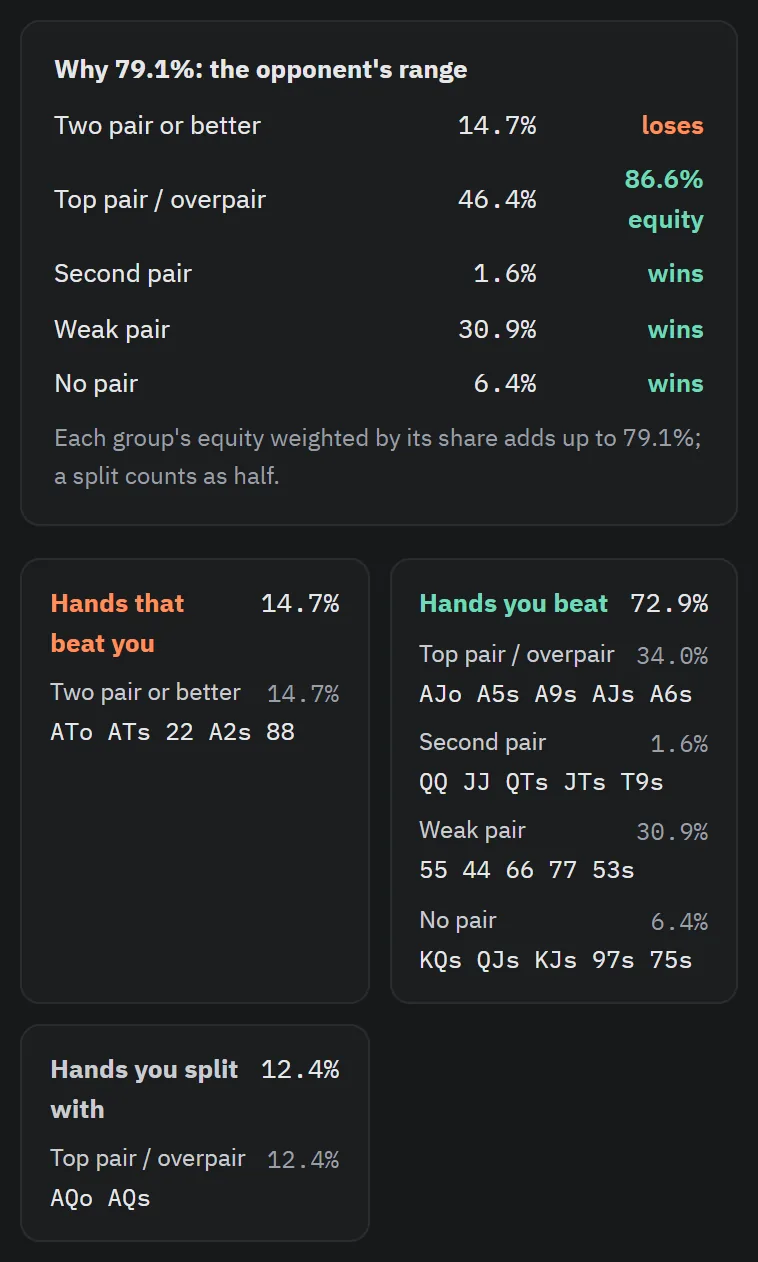
The river is the 2♥, and a straight is now possible. But the hand that makes it (54) is not in the opponent's range. Of the hands you were beating through the turn, this card turned 22 (a set) and A2 (two pair) into winners: 1.1%1 of the opponent's range. Counting hands that were already ahead, such as AT and 88, you lose to 14.7%1 of the opponent's range.
Calling costs 20bb2, so you only need to win 29 times in 1003 to break even. Against the hands the opponent gets here with, this hand wins about 73 times4 in 100 and ties about 12 times4. So a call averages +34.97bb5 and a fold 0bb, which means this fold gave up 34.97bb on average (about $70 in this game).
Most hands that get here fold (50.3%6), but this one calls.
- 28.8%
- Against the opponent's ,
- 79.1%
Where the numbers come from All checked against the solver results
| 11.1% · 14.7% | 1.1%: the share of the opponent's (CO) range at this point held by the hands that were behind yours on the turn and got ahead on the river (22 and A2). 14.7%: the share of all the opponent's hands your hand loses to on the river, including those already ahead such as AT and 88 (100% − 72.9% wins − 12.4% ties) |
|---|---|
| 220bb | The opponent's river bet: the amount you have to put in to call |
| 329 times | Break-even equity 28.8% = 20 ÷ (pot 49.5 + call 20) |
| 473 times · 12 times | Wins 72.9% and ties 12.4% against the opponent's range. Counting ties as half, equity is 79.1% |
| 5+34.97bb | Call EV = 79.1% × pot after the call 69.5bb − 20bb. Fold EV is 0bb |
| 650.3% | The share of my (BTN) whole range that folds here |
Everything a review needs, on one screen.
More about the featuresThe solver's answer for every decision
For each decision, a solver run on your hand's pot, stacks, bet sizes and rake shows whether you played it well or how much EV you gave up.
- PreflopRaise to 8bbGood
- Flop6bb betGood
- TurnCheckGood
- RiverFold−34.97bb
The bars show how often the solver picks each option in the same spot.
4 decisions · 3 good · EV loss 34.97bb
See where every number comes from
28.8% = 20 ÷ (49.5 + 20)
When an explanation says something like "winning just 29 times in 100 breaks even," it also shows where that number comes from.
Your leaks show up as your reviews add up
My play analysis built from 400 example hands
Hand histories from 8 sites incl. PokerStars and GGPoker · Rake included · Finished hands only (no in-game use) · 5 languages
With a different hand, how would the solver play?
On the example hand's river, CO bets 20bb. This is the solver's answer for every hand you could hold in your seat.
- Fold
- Call
- 86bb all-in
- Hands that never get here
Hover over or tap a cell. It's the same data as the app's range chart.
Three steps to your first review.
Install
Install the app on a Windows PC. No graphics card needed.
Get your hand histories
Turn on hand history saving at your poker site, or download your histories.
Paste and review
Paste the history, and the app fills in the ranges and bet sizes for you.
Compared with using a solver on your own.
| Task | Solver on your own | SolvUp |
|---|---|---|
| Setting up the spot | Solver on your own You set the board, ranges, stacks and bet sizes yourself | SolvUp Paste a hand history and the app fills them in |
| Reading the results | Solver on your own You interpret strategy charts and numbers yourself | SolvUp Good or the EV loss for every decision, with the reason in plain sentences |
| Comparing with your play | Solver on your own You find your action in each hand and line it up yourself | SolvUp Your choice, right next to the solver's answer |
| What to study | Solver on your own You sort through many hands on your own | SolvUp Your leaks, gathered by seat and by spot |
If you have used a solver before, How it's calculated covers the tree and the precision settings.
Frequently asked questions
I've never used a solver. Is that OK?
Yes. Ranges and bet sizes are set from your hand history for you, and the results are explained in sentences. Tap any term with a dotted underline to see what it means.
Which solver does SolvUp use?
SolvUp uses its own solver engine. It was written from scratch in Rust and computes with a CFR (counterfactual regret minimization) family algorithm, the kind used in poker AI research. Preflop decisions come from tables solved ahead of time; after the flop it combines spots solved ahead with solving on your PC. The accuracy target is 0.5% of the pot on the flop and 0.1% on the turn and river, and no graphics card is needed.
Can I trust the results?
Every number behind a verdict is a solver value. Common heads-up pots read a precise solve of the same line done ahead of time (at a similar stack and open size); everything else is solved right on your PC for that hand. Choices the solver itself mixes, and small gaps within the calculation precision, don't count as mistakes, and the review screen notes the precision and the important assumptions. The detailed criteria are under How it's calculated in Help.
How long does it take to review a hand?
From a few seconds to a few minutes, depending on the hand and your PC. A hand where three or more players saw the flop is judged through preflop only for now, so it takes a few seconds. Times by pot type are on the Download tab. While it solves, you can keep queuing up other hands.
How much does it cost?
$19.99 a month or $179 a year (about $14.92 a month). Sign up and review 10 hands first, no card needed. Details are on the Pricing tab.
Review your first hands for free.
10 free hands when you sign up · No card needed · Then $19.99/mo or $179/yr · Request a refund within 14 days of payment
The Mac app is coming in an update.
Paste it in,
and the app does the rest.
Ranges, bet sizes, stacks and rake are read from the hand history, and the solver solves every decision. No history? You can enter the cards and actions yourself.
The example hand on the home page is the app's review of the history on the right. If you have used a solver before, see How it's calculated too.
Hand history (PokerStars format, some lines left out)
PokerStars Hand: Hold'em No Limit ($1/$2)
Table 6-max  Seat #1 is the button
Dealt to Hero [Ah Qh]
P6: raises $3 to $5
Hero: raises $11 to $16
*** FLOP *** [As 8d 3c]
Hero: bets $12
*** TURN *** [As 8d 3c] [Td]
Hero: checks
*** RIVER *** [As 8d 3c Td] [2h]
P6: bets $40
Hero: folds
Settings the app read
- Game
- NL Hold'em cash · 6-max
- Seats
- BTN (me) vs CO
- Effective stack
- 100bb
- Rake
- None (example)
- Preflop
- Pre-solved 6-max solution
- From the flop on
- Solved right on your PC
Among their hands,
where does yours stand?
The hands your opponent gets here with are sorted by type, so you can see which ones beat your hand and which ones it beats.
- Each type's share of their range, and your equity against it
- Hands that beat yours, hands yours beats, hands that tie
- And so, why your equity is the number it is
With a different hand,
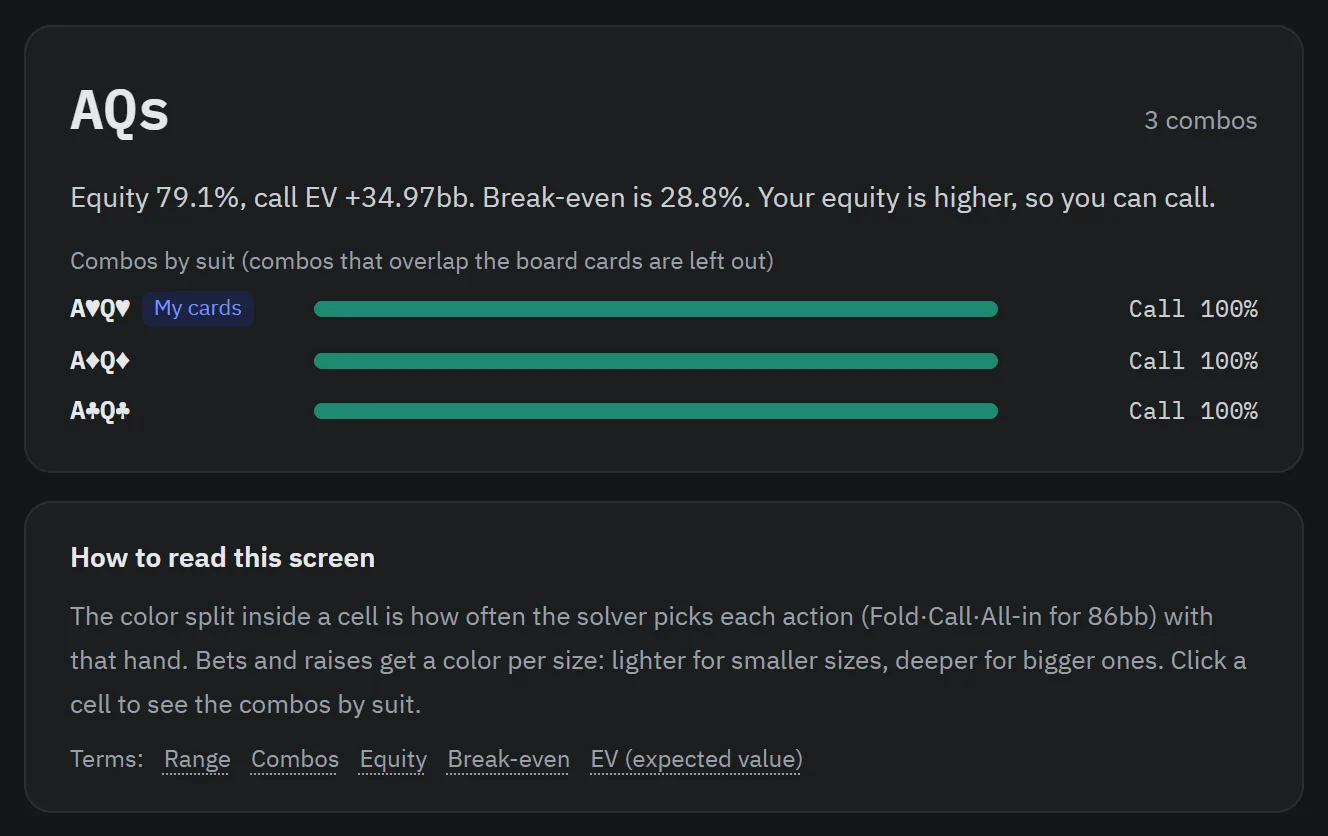
how would the solver play?
Colors show the solver's answer for every hand in the same spot. Click a cell to see the combos by suit.
As reviews add up, your leaks show.
See the seats and spots where you miss the most EV, and how your style differs from the solver's.
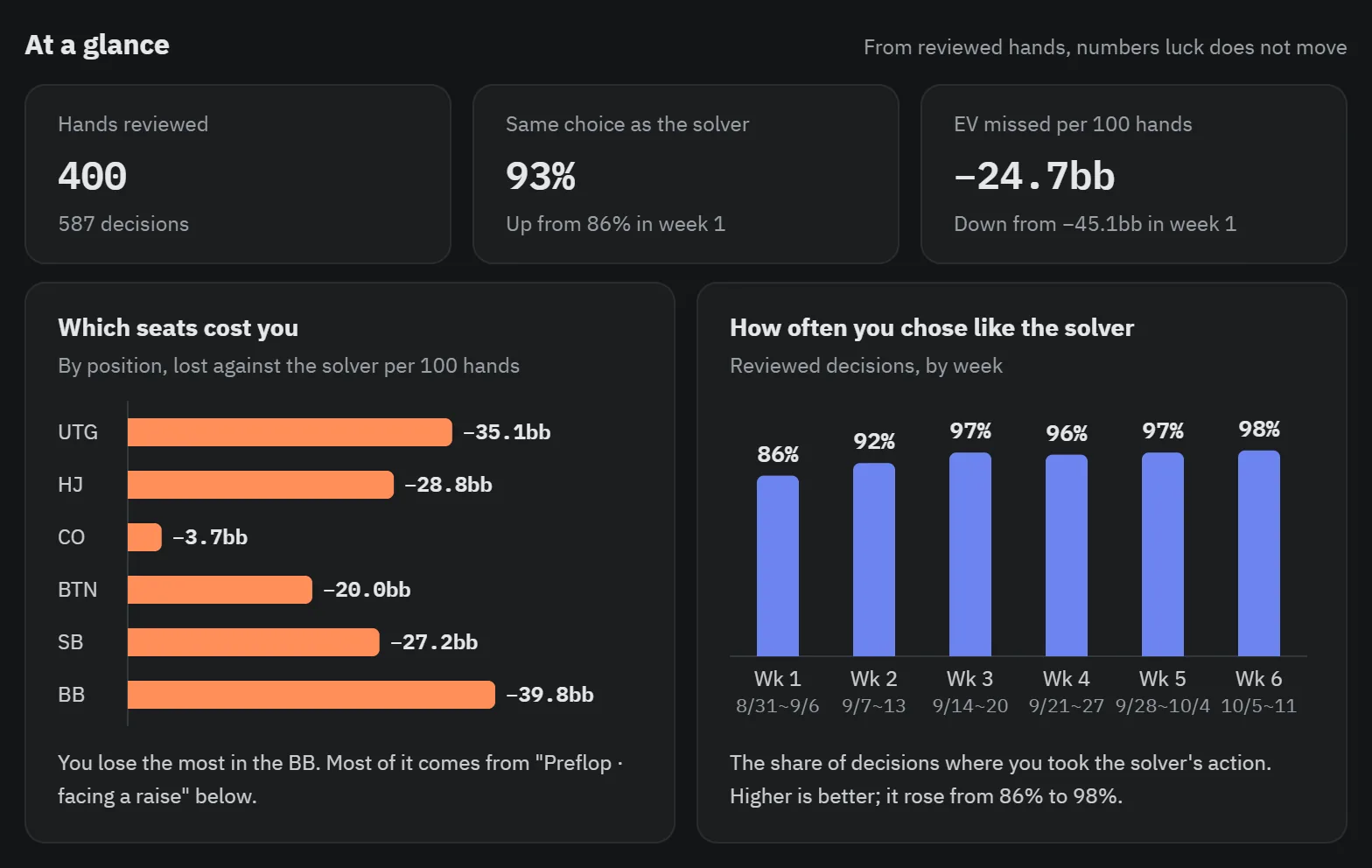
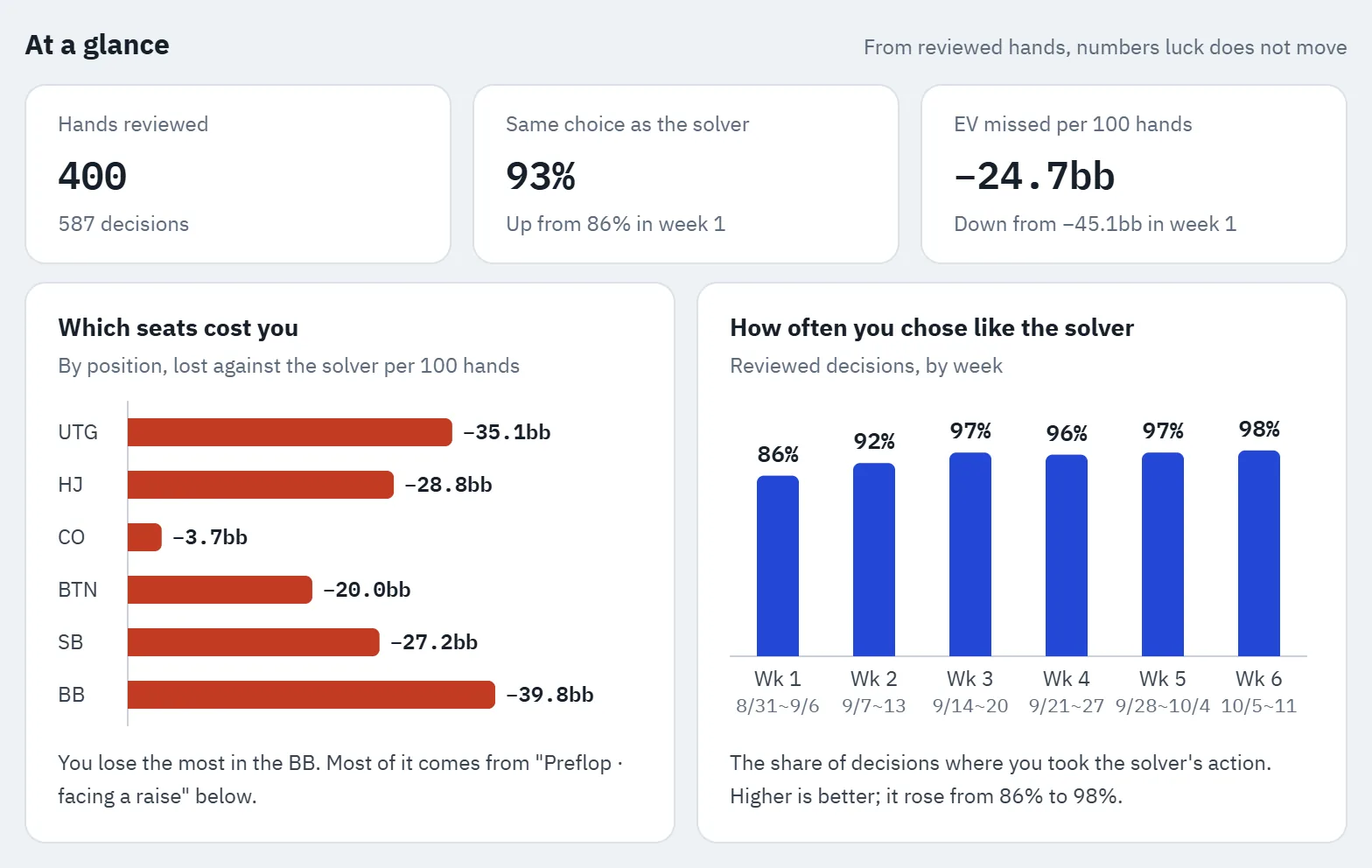
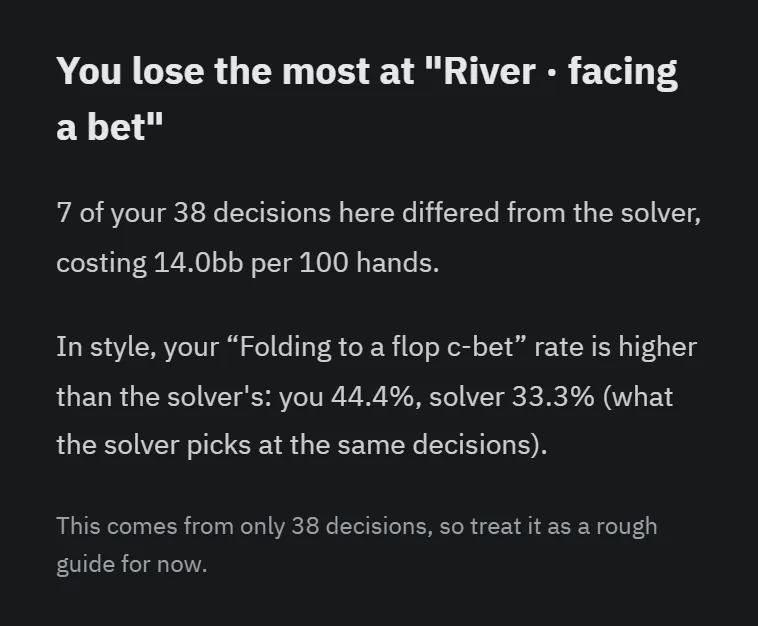
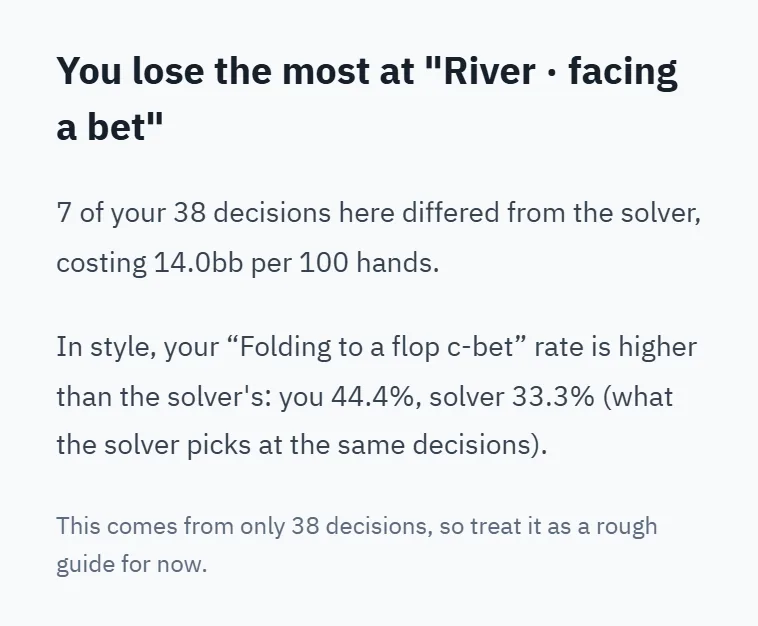
Click an image to see it larger.
This example screen is built from 400 made-up hands. Once you review your own hands, it fills with your numbers.
Trainer: play hands against the solver.
Answer with a button and it is graded on the spot. Your opponent plays the solver's frequencies, and the hand goes on from the flop to the river. Beside the table you see the solver's answer, each action's EV and why, for every decision.
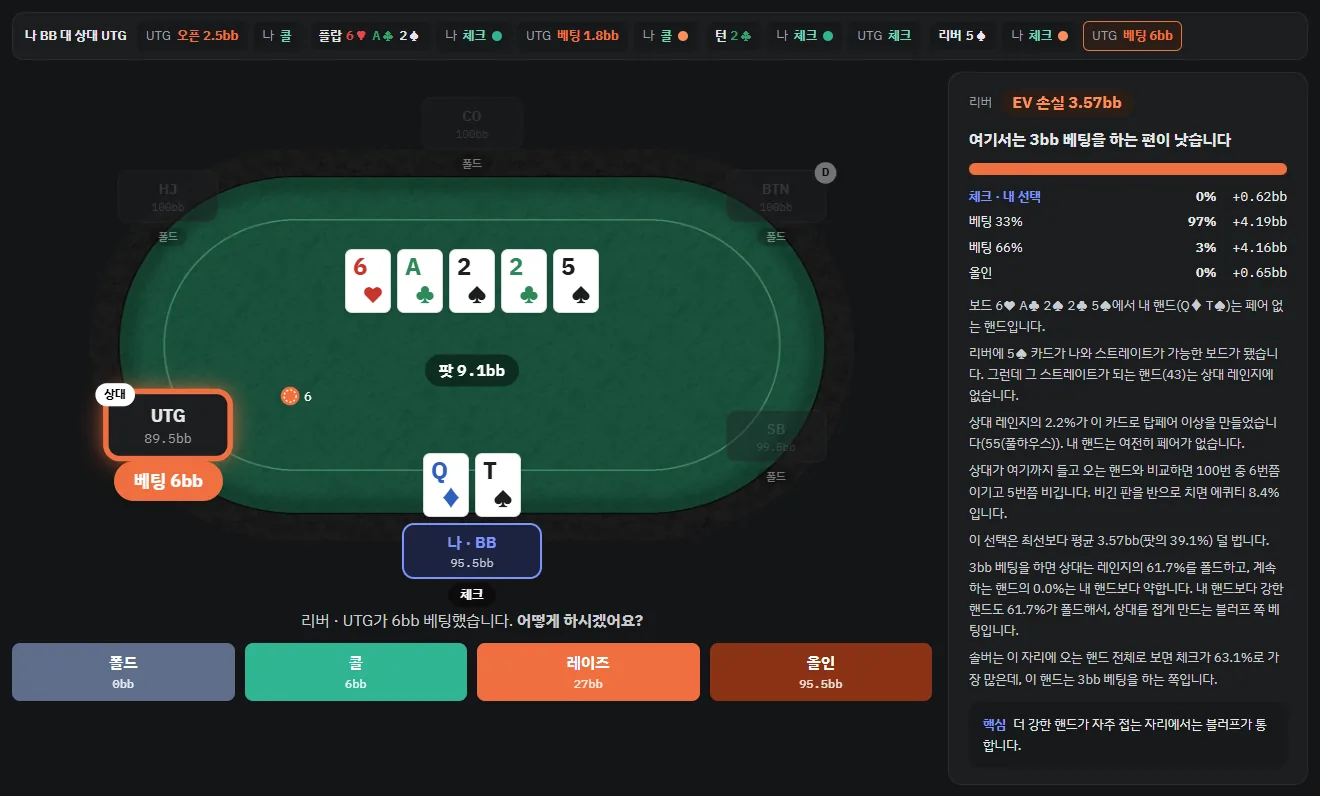
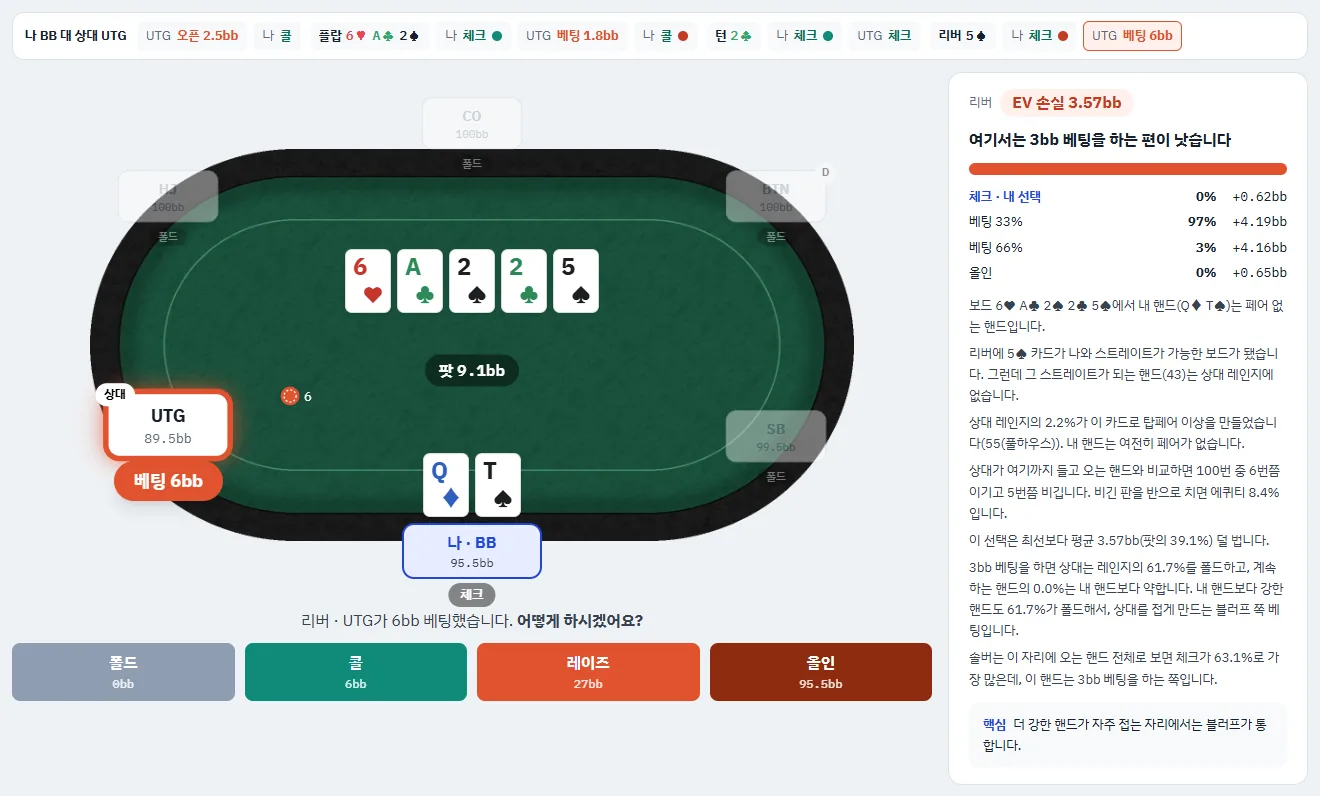
- 15 open-and-call matchups at 6-max, plus heads-up · 100bb and 50bb
- Preflop-only practice (answering 3-bets and 4-bets included)
- Hands you play are kept, so you can go over every decision again
- 10 hands a day free, unlimited with Pro
Features at a glance
What the app does today.
Input
- Reads hand histories from PokerStars · GGPoker · ACR · CoinPoker · Winamax · 888poker · PartyPoker · iPoker
- No history? Enter the cards and actions manually
- Queue up many hands at once and review them in order
- Applies the right rake for the site and stakes automatically
Calculation
- Preflop: pre-solved 6-max and heads-up solutions with rake included (50bb · 100bb, whichever stack is nearer)
- From the flop on: when there is no pre-solved result, solved right on your PC at that hand's pot, stacks and sizes
- Postflop for heads-up pots (a flop seen by three or more is judged through preflop)
- Pre-solved flops: limped pots and common single-raised pots (at a similar stack and open size)
- Calculation precision shown for every decision
Results
- Good or EV loss for every decision, explained in plain words
- How often the solver picks each option, and the options it solved (bet sizes)
- The opponent's range breakdown, and your hand's equity against it
- Range chart: the solver's answer for every hand, combos by suit
- Important assumptions (antes and so on) are flagged separately
- 한국어 · English · 日本語 · 简体中文 · 繁體中文
Study
- My play analysis: EV loss by seat and by spot
- Style comparison: VPIP · PFR · 3-bet · c-bet · fold to c-bet
- How often you chose like the solver, week by week
- Browse hands with the biggest EV loss first
- Reopen past reviews from History
Advanced settings
- Bet and raise sizes, and how many raises
- Sizes by position (IP · OOP), no donk bets
- Edit your range and the opponent's range by hand (starting from the solver's ranges)
- Calculation precision
- Solve the flop at the sizes played instead of snapping to the pre-solved sizes
Try it on your own hands.
Try it first with the free trial.
The Mac app is coming in an update.
Try it free, then decide.
The solving runs on your own PC, so you pay the same however many hands you review.
Prices include taxJust sign up · No card needed · 10 hands
- Every feature, nothing held back
- Trainer: 10 hands a day (apart from the trial hands)
- Hands you've reviewed stay viewable after the trial runs out
Billed monthly · about 67¢ a day · cancel anytime
- Unlimited reviews
- Unlimited trainer
- All features
- Updates included while you subscribe
Full refund within 14 days of paying if you haven't run a review, partial refund otherwise. Refund policy
Included in every plan.
More about the featuresThe solver's answer for every decision
How often the solver picks each option in the same spot, and the EV loss of your choice.
- PreflopRaise to 8bbGood
- Flop6bb betGood
- TurnCheckGood
- RiverFold−34.97bb
4 decisions · 3 good · EV loss 34.97bb
Range chart
Cell by cell, how the solver would have played other hands.
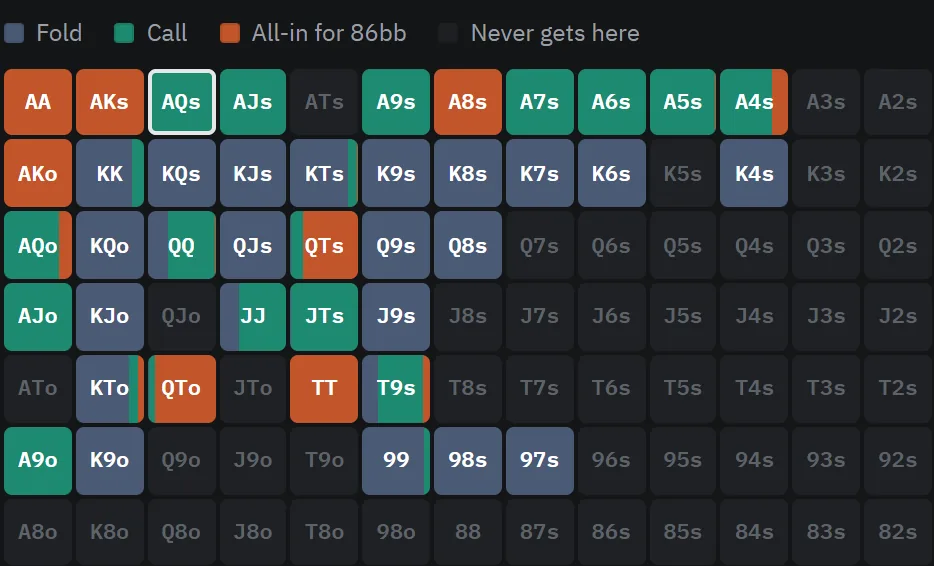
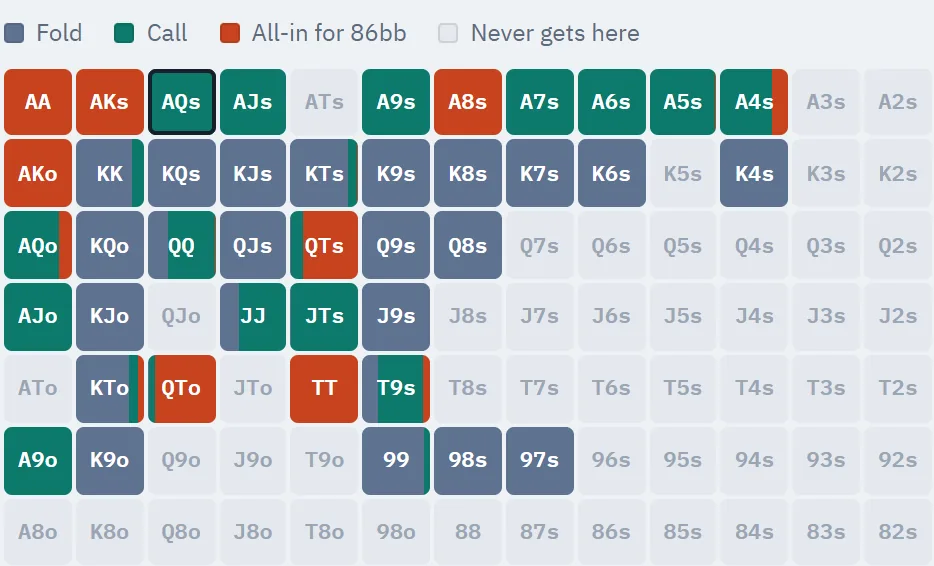
The top-left part of the chart. Click to see the whole chart larger.
My play analysis
As your reviews add up, you can see where you miss the most EV.
My play analysis built from 400 example hands
Trainer
Play hands against the solver and get every decision graded. 10 hands a day free, unlimited with Pro.
Pricing FAQ
Do I need to sign up?
Yes. The free trial also runs on a registered account, because trial hands are counted per account. No card needed.
Is anything locked in the trial?
No. Every feature works, right down to changing bet sizes and ranges in Advanced settings and solving again. Only the number of hands you can review is limited.
What happens when I've used up the trial hands?
Only new reviews stop. Hands you've already reviewed and your play analysis stay viewable without paying.
How is monthly different from yearly?
The features are the same. Yearly is paid for a year at once and costs about 25% less than monthly. You can cancel either at any time and keep using it until the end of the period you paid for.
Does the trainer use up trial hands?
No. The trainer is separate from the trial hands: you can play 10 hands a day for free. Pro has no limit.
Why aren't reviews limited?
Because the solving runs on your PC. Reviewing a lot doesn't add to our costs, so we don't count reviews.
Download SolvUp
A Windows desktop app. The Mac app comes in an update.
If Windows shows a “Windows protected your PC” window while installing, click More info → Run anyway. It appears because SolvUp is a new app Windows does not know well yet. How to install
A phone app is planned for a future update.
SolvUp for Windows
Windows 10 · 11 (64-bit)
- Graphics card
- Not needed. Solving runs on the CPU, and more cores solve faster.
- Memory
- It adjusts itself to solve within the memory you have free. If memory runs short, the last street is settled by dealing out every card instead, and the review screen says so.
- Internet
- Required. Your account is checked each time a review starts. Finished reviews stay viewable even when you're offline.
Three steps to your first review.
Install
Download the installer and run it.
Get your hand histories
Turn on hand history saving at your poker site, or download your histories. Instructions for each site are below.
Paste and review
Paste the history or open the file. No history? You can enter the cards and actions yourself.
Getting hand histories, by site
PokerStars
In the PokerStars client, go to Settings → Playing History → Hand History and turn on Save My Hand History. This is also where you choose the folder and how long histories are kept. From then on, every hand you play is saved as a text file in a folder on your PC. In older versions, the same setting is under Options → Instant Hand History Options.
GGPoker
GGPoker doesn't save histories on your PC, so you download them from PokerCraft. Open PokerCraft at the bottom right of the client, pick the game type and date range, select all sessions and click Download. You can get up to 20,000 hands at a time from the last 90 days, and your name appears as Hero.
ACR
ACR (Americas Cardroom) saves the hands you play as text files on your PC. In the client, open the settings wheel at the top right → Hand Histories in the left menu to see or choose the folder.
CoinPoker
In the CoinPoker client, open the ▼ next to your name at the top right → PokerIntel → Game History → Cash Games, pick the period and press Download Hands at the top right: a download link comes to your account's email (check spam too).
Winamax
Winamax saves the hands you play as text files on your PC. On Windows they are in Documents\Winamax Poker\Accounts\(your username)\History.
888poker
In the 888poker client, open the settings wheel at the top → Game settings tab and tick Keep my hand history in. From then on, every hand you play is saved as a text file in Documents\888poker\HandHistory. Keep Language on the same tab set to English.
PartyPoker
partypoker doesn't save histories on your PC, so you download them: click the arrow next to your avatar → My Game → Export Hands, pick the dates and click Download. You can get hands up to yesterday from the last 40 days, up to 10,000 at a time, with opponents' names hidden.
iPoker
On iPoker network sites, turn on Store Hand History Locally under My Account → Settings → General, and the hands you play are saved as XML files (.xml) in a folder on your PC. Menu names and the folder can differ from site to site. Open the saved .xml file as it is with 'Open history file'; if you use a tracker, a file exported in 'iPoker format' works too.
How long a hand takes
Times measured on public sample hands with the app's own settings, on an 8-core gaming PC (Ryzen 7 7800X3D, 32 GB memory). Common heads-up single-raised pots read a flop solved ahead and finish in about 10 seconds; a hand with no flop solved ahead (other sizes or ranges) solves the flop on your PC and takes a few minutes.
Measured October 2026 · 5% rake (3bb cap) · real public hand histories · Hands that end on the flop are quicker, and PCs with fewer cores take longer.
Help
Common questions and terms in one place. For anything not covered here, contact us.
Getting started
Do I need an account?
Yes. The free trial also runs on a registered account, since trial hands are counted per account. No card needed.
Can I use it without internet?
Starting a new review needs an internet connection, because your account and plan are checked each time a review starts. The solving runs on your PC, so connection speed doesn't matter, and finished reviews stay viewable even when you're offline.
What is a solver?
A program that calculates the strategies in poker that respond best to each other, often called GTO strategy. For each decision in your hand, SolvUp shows what that strategy would have done and how much your choice cost.
Which solver does SolvUp use?
SolvUp uses its own solver engine. It was written from scratch in Rust and computes with a CFR (counterfactual regret minimization) family algorithm, the kind used in poker AI research. Preflop decisions come from tables solved ahead of time; after the flop it combines spots solved ahead with solving on your PC. The accuracy target is 0.5% of the pot on the flop and 0.1% on the turn and river, and no graphics card is needed.
I've never used a solver. Is that OK?
Yes. Ranges and bet sizes are set from your hand history for you, and the results are explained in sentences. For unfamiliar terms, see the glossary below. Once you're comfortable, you can adjust things yourself in Advanced settings.
Can I review without a hand history?
Yes. For hands with no history, like live games, you can enter the cards and actions yourself and review them.
Which games can I review?
NL Hold'em cash games at tables of 2 to 6 players. Tournaments are coming in an update (Coming in updates). PLO isn't supported.
Can I use it while I play?
SolvUp has no feature that shows answers during a game; it only reviews the histories of finished hands. Rules on which tools you may use while playing differ from site to site, so please check the rules of the sites you play on as well.
Which languages is it in?
Explanations are available in Korean, English, Japanese, Simplified Chinese and Traditional Chinese.
Install and updates
How do I install it?
- On the Download tab, click Install for Windows to download SolvUp-setup.exe.
- Open the downloaded file. No administrator rights are needed; it installs for your Windows account only.
- If Windows shows Windows protected your PC, click More info in that window.
- Click the Run anyway button that appears at the bottom. The installation starts.
- When it finishes, SolvUp opens. Sign in with your account and you are ready.
More info
Why does the “protected your PC” window appear? Is it safe?
Windows shows this window (SmartScreen) for programs it has not seen before or that few people have downloaded yet. If the installer came from solvup.app, it is fine to go ahead. Do not run copies from anywhere else. On a PC locked down by an administrator, such as a work PC, the Run anyway button may not appear.
How do I update?
When a new version is out, it installs by itself the next time you open the app, and the app reopens as the new version. If one comes out while the app is open, a New version line appears at the bottom of the left menu; click it to update right away. You can also check yourself under Settings, About. A review that was being solved needs to be started again after the update.
How do I uninstall it?
In Windows Settings, go to Apps, then Installed apps, find SolvUp and choose Uninstall. You can choose whether to delete your review history too. Your account and remaining trial hands are kept on the server, so they are still there when you reinstall and sign in.
Results
Is EV loss money I actually lost?
No. It's how much less your choice wins on average, per hand, than the solver's choice would if the same spot were played over and over. The result of a single hand depends on luck, but EV loss measures the decision with luck taken out. It is calculated assuming your opponent also plays like the solver.
Can I trust the results?
Every number behind a verdict is a solver value. Common heads-up pots read a precise solve of the same line done ahead of time (at a similar stack and open size); everything else is solved right on your PC for that hand. Choices the solver itself mixes, and small gaps within the calculation precision, don't count as mistakes, and the review screen notes the precision and the important assumptions. The detailed criteria are under How it's calculated below.
How long does it take to review a hand?
From a few seconds to a few minutes, depending on the hand and your PC. A hand where three or more players saw the flop is judged through preflop only for now, so it takes a few seconds. Times by pot type are on the Download tab. While it solves, you can keep queuing up other hands.
Prices and payment
How much does it cost?
$19.99 a month or $179 a year (about $14.92 a month). Sign up and review 10 hands first, no card needed. Details are on the Pricing tab.
How does the free trial work?
Sign up and you can review 10 hands without entering a card. Every feature is included, and the hands you've reviewed stay viewable after the trial runs out.
Can I get a refund?
We recommend trying the free trial (10 hands) first. If you have not reviewed any hand within 14 days of paying, we refund the full amount; if you have, we refund it less the days used and 10% of the rest. You ask for a refund in My account, and it is processed within 3 business days. See the Refund Policy for details.
How many PCs can I use it on?
One account can be used on one PC. To switch PCs, release the PC you were using (in the app or on this site's account page) and sign in on the new PC.
Can I use it on a Mac?
A Mac (Apple silicon) app is in the works as an update.
Can I use it on my phone?
For now there is only the Windows desktop app. A Mac app and a phone app are planned for future updates.
Nothing matches your search. Contact us with your question.
Glossary
EV, EV loss
The chips you win on average per hand if the same spot is played over and over. EV loss is how much less you win on average by making your choice instead of the solver's.
bb
Amounts measured in big blinds. In NL 1/2, 1bb is $2.
Equity
Your share of the pot once all the remaining cards are dealt. Ties count as half.
Break-even equity
How often a call has to win so it doesn't lose money: the amount to call ÷ the pot after the call.
Range
All the hands your opponent (or you) could reasonably hold in this spot.
Mixed strategy
When the solver splits the same hand between several choices. Mixed choices are worth the same.
Effective stack
The smaller of the two players' stacks. It's the most that can actually change hands in this pot.
Rake
The fee the poker site takes out of the pot.
Solution
A strategy the solver worked out ahead of time. SolvUp's preflop verdicts use the pre-solved solution for the table, 6-max or heads-up, at 50bb or 100bb, whichever is nearer the stack, and are shown for reference only when the effective stack is shorter than about 30bb or deeper than 150bb.
Donk bet
A bet by the player who wasn't the aggressor on the previous street, made before the aggressor gets to act.
How it's calculated
The details you may want if you've used a solver before. The review screen also notes, for every solve, its precision and the important assumptions.
- Read the hand historyPot, stacks, bet sizes, rake
- PreflopRanges from the pre-solved 6-max or heads-up solution
- Flop · Turn · RiverRead from a pre-solved result, or solved on your PC
- Compare each decisionThe solver's choice and the EV loss
- Preflop
- Verdicts come from the 6-max or heads-up 50bb and 100bb solutions, pre-solved with rake: the one for the table, at whichever stack is nearer the effective stack. A size that isn't in the solution is judged at the nearest size, and if the effective stack is shorter than about 30bb or deeper than 150bb, the verdict is shown for reference only.
- From the flop on
- Common heads-up pots read a pre-solved result; otherwise a tree is built from that hand's pot, stacks, rake and the bet sizes actually played, and solved right on your PC. Ranges start from the preflop solution and narrow along the actual action, following the solver's strategy.
- Bet sizes
- The default tree uses 66%-pot bets and pot-sized raises, with up to 2 raises per street. The sizes actually played in the hand are added on top. In Advanced settings you can change the sizes, set sizes by position, or turn on No donk bets.
- Precision
- It solves until the remaining error (exploitability) drops below 0.5% of the pot on the flop and 0.1% on the turn and river, with at most 1,000 iterations.
- 3-way pots
- A hand where three or more players saw the flop is judged through preflop only for now. Postflop judgment for these hands is coming in an update.
- Pre-solved flops
- For limped pots and common single-raised pots, the flop is read from a precise solve of the same line done ahead of time. If the stack or open size differs a little from the hand, the nearest one is read.
- What EV loss is measured against
- It assumes your opponent also plays like the solver. Your opponent's real tendencies aren't included; if you set the opponent's range yourself in Advanced settings, it solves again with that range.
- What doesn't count as a mistake
- Choices the solver itself mixes, and EV gaps within the calculation precision.
- What's noted separately
- Cases like antes, money the site added to the pot, a small blind that differs from the solution, rake that couldn't be modeled, and boards run more than once (reviewed on the first board).
- Coming in future updates
- Tournaments, Mac (Apple silicon) and phones.
- Not supported
- Other games, such as PLO.
Trainer
Loading…
In the app, you play the whole hand
Here you make one preflop choice; the app's trainer plays on against the solver from the flop to the river.
- Your opponent bets, calls and raises at the solver's frequencies; every decision is graded on the spot
- For every decision: the solver's frequencies, each action's EV, a full explanation of why and a one-line takeaway
- 15 open matchups at 6-max plus heads-up, 100bb · 50bb, and preflop-only practice
- Hands you play are kept, every decision ready to go over again
- Reviews: paste your own hand history and see the solver's answer at every decision
News
App updates and service notices. When the terms or a policy change, it is announced here first.
Loading…
SolvUp Terms of Service
This is a translation. If it differs from the Korean text, the Korean text applies.
Article 1 (Purpose)
These Terms set out the conditions and procedures for using the software and related features provided by SolvUp, and the rights and obligations of SolvUp and its users.
Article 2 (Definitions)
- "Software" means the SolvUp program for Windows (including any later macOS version) and its updates.
- "License" means the right to use the paid features of the Software, offered as a monthly or yearly subscription.
- "User" means a person who agrees to these Terms and creates a SolvUp account.
Article 3 (Effect of and Changes to These Terms)
- These Terms are posted at solvup.app, and Users agree to them when signing up. Before a paid subscription is paid for, the fees, automatic renewal, the limits on withdrawal and the refund criteria are shown again on the payment screen.
- SolvUp may change these Terms to the extent that relevant laws permit. When it does, it will announce at solvup.app, starting 7 days before the effective date, what changes and why, with a comparison of the versions before and after the change; changes unfavorable to Users will also be notified separately to the account email 30 days in advance.
- A User who does not agree to the changed Terms may cancel the subscription before the effective date and, in that case, gets back the subscription fee for the remaining period with no penalty. A User who has not refused by the effective date is deemed to have agreed to the changed Terms, and SolvUp will state this when it announces the change.
Article 4 (What We Provide)
- The Software is a learning tool that reads the histories of poker hands the User has already finished and shows, for each decision, the answer of a solver (a game-theory calculation program), the difference in expected value, and an explanation.
- Calculations are performed on the User's PC. Where SolvUp has calculated a result in advance, the Software downloads it from the SolvUp server during the review.
- The Software sends the flop calculation results that the User's PC calculated itself to the SolvUp server, and SolvUp checks them and uses them to make reviews faster for all users. The results sent contain no account or hand history (see section 1-1 of the Privacy Policy).
- The Software does not provide real-money gaming, betting, or real-time advice during play.
- The free trial allows use of all features up to a set number of hands. After the trial is used up, results already reviewed remain viewable.
Article 5 (Fees and Payment)
- Orders and payments for SolvUp are handled by our online reseller Paddle.com. Paddle.com is the Merchant of Record for all our orders: it processes payments, handles taxes, issues receipts and pays refunds, and Paddle's buyer terms also apply to your purchase.
- Fees are shown on the pricing page at solvup.app, including taxes.
- A subscription is charged automatically at the chosen interval (monthly or yearly) until it is canceled. For yearly subscriptions, the amount and date of the charge are sent to the account email 7 days before the renewal.
- When SolvUp raises the subscription fee, it will notify Users, 30 days before the increase applies, of the date of the increase, the amounts before and after, and the payment method, and will obtain the User's consent. If the User does not consent, the subscription ends when the period already paid for ends, and the increased amount is not charged.
- If a User under the age of 19 made a payment without the consent of their legal representative, the User or the legal representative may cancel the payment, and in that case the full amount is refunded.
Article 6 (Cancellation, Withdrawal and Refunds)
- Users may cancel their subscription at any time from My account on the site. Once canceled, no further charges are made from the next billing date, and the subscription can be used until the end of the period already paid for; alternatively, the User may end it right away and get back the amount set by the Refund Policy. The My account screen shows both options together with the result of each.
- Refund amounts and conditions follow the Refund Policy posted on solvup.app. If you have not reviewed any hand within 14 days of paying, we refund the full amount; if you have, or after 14 days, we refund it less the days used and 10% of the rest. An account that got a full refund without reviewing can no longer subscribe. Contact us and we will lift it after checking.
- The Software is digital content, so once a review is started after payment, withdrawal for the part already provided is limited under Article 17(2)(5) of the Act on Consumer Protection in Electronic Commerce of Korea. For this reason, SolvUp offers a free trial and tells Users this before they pay.
- If what was provided differs from what was displayed or advertised, or from the contract, the User may withdraw within 3 months of receiving it, or within 30 days of learning of that fact. Withdrawal and refunds for reasons set by law, such as defects in the Software, are not limited.
- You ask for a refund in My account; the amount is set as of the day you ask, and paid use pauses until it is processed. SolvUp asks the reseller to cancel the payment within 3 business days of receiving the request. If it is later than that, we pay the late-payment compensation set by the same Act for the delay.
Article 7 (Use of the License)
- One License can be used on one PC belonging to the User. When changing PCs, the User can release the old PC in the app and register the new one.
- A License may not be sold, lent or shared with others.
- The Software is used with a signed-in account, and each time a review starts, it checks the account and License with the SolvUp server over the internet. At that time, the app sends a device identifier and similar information to the SolvUp server (see the Privacy Policy).
- While not connected to the internet, or while the SolvUp server is under maintenance or being restored, new reviews cannot be started. Results of finished reviews remain viewable during that time. Scheduled maintenance is announced in advance at solvup.app.
Article 8 (Service Interruptions and Compensation)
- For time during which paying Users could not start new reviews because of a SolvUp server failure or maintenance, SolvUp adds to their usage period twice the portion exceeding 10 hours in the case of maintenance announced in advance, or three times that time in the case of a failure not announced in advance.
- If failures not announced in advance total more than 72 hours in a month, the User may cancel the subscription and get back the subscription fee for the remaining period.
- This excludes interruptions caused by force majeure, such as natural disasters, for which SolvUp is not at fault.
Article 9 (Updates)
Updates are provided free of charge, with notice of what changes. For an update that is essential to stay compatible with the server, SolvUp states the reason, and new reviews may be restricted until it is installed.
Article 10 (User Obligations)
Users will not do any of the following:
- Reverse-engineer or modify the Software, or bypass the License check
- Resell the Software or its results, or offer them for a fee, without SolvUp's permission
- Use the Software in a way that violates a poker site's terms of use. Users are responsible for checking and following each poker site's rules on which tools may be used and when.
Article 11 (Restriction of Use and Account Deletion)
- You can leave at any time from My account on the site. An account with a running subscription can leave once the subscription is cancelled and its paid period ends; payment records are kept separately for five years after leaving, as the law requires.
- If a User violates Article 10, SolvUp may restrict their use or suspend their account. In that case, SolvUp will notify the User of the reason by email and give them an opportunity to object for 7 days in the case of a restriction of use, or 30 days in the case of an account suspension. However, where the service is directly harmed, such as by bypassing the License check, SolvUp may restrict first and notify afterwards.
Article 12 (Intellectual Property)
Copyright and other intellectual property rights in the Software and the site belong to SolvUp. Open-source components included in the Software are governed by their own licenses, which are listed on the app's About screen.
Article 13 (Limitation of Liability)
- The Software's analysis is reference material to support learning and does not guarantee game results or profits.
- Solver calculations are results within the set precision and tree (bet sizes and so on), and the app shows the calculation precision and anything it could not model on each review screen.
- SolvUp compensates Users, in accordance with relevant laws, for damages it causes them through intent or negligence.
Article 14 (Changes to Features and End of Service)
SolvUp may change features or discontinue some of them. Changes unfavorable to paying Users are notified to the account email 30 days in advance, and the User may cancel before they take effect and get back the subscription fee for the remaining period. If SolvUp ends the service, it will give notice 30 days in advance and refund the remaining subscription period.
Article 15 (Notices)
SolvUp sends notices meant for an individual User to the account email, and posts notices meant for all Users in News at solvup.app for at least 7 days. Matters that significantly affect Users are also sent by email.
Article 16 (Dispute Resolution)
- Complaints and requests for redress of damage are received at contact@solvup.app, and SolvUp will share its plan for handling them within 3 business days of receipt.
- If no agreement is reached, the User may apply for mediation to the Content Dispute Resolution Committee (Korea) or the Consumer Dispute Mediation Committee of the Korea Consumer Agency.
- These Terms are governed by the laws of the Republic of Korea. Lawsuits are brought in the district court with jurisdiction over the User's domicile at the time the suit is filed. If the User has no domicile or it is unknown, they are brought in the district court with jurisdiction over the User's place of residence; if the User lives abroad, in the court of competent jurisdiction under the Civil Procedure Act of Korea.
Business information
SolvUp is operated by 솔브업 (SolvUp), a business registered in Korea (registration no. 891-49-01200). Under these Terms, Users contract with SolvUp, and payments are handled by Paddle as set out in Article 5. For questions, write to contact@solvup.app.
Addendum: These Terms take effect on October 27, 2026.
SolvUp Privacy Policy
This is a translation. If it differs from the Korean text, the Korean text applies.
In accordance with the Personal Information Protection Act of Korea, SolvUp processes users' personal information as follows.
1. Personal information we process, and why
| When | Items | Purpose | Retention period |
|---|---|---|---|
| Sign-up and sign-in | Email address, password (stored with irreversible encryption; not even SolvUp can see it), app language, whether you agreed to receive news emails, and your Google account ID if you sign in with Google, and when you agreed to the terms and the privacy policy and to which version | Creating your account and signing you in, sending sign-up verification codes and password reset emails, replying to inquiries, and, if you agreed, emails about new features and discounts | Until you delete your account |
| App use | Device identifier (a random value created for each installation), PC name, operating system and version, number of CPU threads, memory size, app version, time of last use | Checking your plan, limiting the number of PCs per account, handling errors | Until you delete your account |
| When you review | Review statistics: site, pot type, blind size, effective stack, rake, players left on the flop, calculation time, number of decisions and mistakes, EV loss, whether Advanced settings were used, error details | Counting free-trial use, improving the service | Until you delete your account |
| When a review fails or a hand history cannot be read | The hand: the full pasted hand history (including the nicknames of the other players at the table) or the hand as you entered it, the error and the calculation engine's last output, the review settings, the app version, the operating system and its version, the number of CPU threads and the memory size | Finding the cause of the failure and fixing the error | 180 days |
| Site visits | A random visitor value that changes every day, the screens viewed, the page language, the device type (phone/PC), the country you connect from (looked up from the IP address), the domain of the site you came from and ad tags (utm) on the first visit, and the download, notification and sign-up buttons pressed (no cookies are used, and the IP address is not stored) | Visit statistics and improving the site | 90 days (daily totals with no set period) |
| Server access | IP address, access time, requested URL | Preventing abuse (rate limiting), security | 5 days |
| Contact us (site and app) | The account's email address, the kind and text of the inquiry, attached screenshots and our answers; for an inquiry sent from the app, the app version and the operating system and its version; when you choose to attach it in the app, that hand's review record (the hand history and the review result, which may include the nicknames of other players at the same table) | Answering inquiries, and handling consumer complaints and disputes | 3 years from when the inquiry was handled (records of consumer complaints and dispute handling under the Act on Consumer Protection in Electronic Commerce of Korea), kept for this period even if the account is deleted |
| Inquiry emails | Email address and message content | Replying | Until the purpose is fulfilled, or until you ask us to delete it |
| When an account that used the free trial is deleted | The email address turned, with a key only the SolvUp server knows, into a value that cannot be turned back; the number of free-trial hands used | To stop the same email address from signing up again for a new free trial | 1 year from the last deletion |
| When you pay | Payment details Paddle sends us: transaction, subscription and customer IDs, the product (monthly or yearly), the amount, tax and fee with the currency, the payment, renewal and cancellation dates, the subscription status, and refund requests | Confirming subscriptions and applying the plan, refunds, answering questions, tax filing | 5 years (records of contracts, payments and refunds under the Act on Consumer Protection in Electronic Commerce of Korea) |
| When we manage an account | What we did to an account (plan and free trial changes, restrictions, refund and inquiry handling) with that account's email address, the reason for a restriction and our internal notes | Dealing with misuse, handling disputes | Records of actions: 2 years; internal notes: until the account is deleted |
1-1. Calculation results also sent (not personal information)
When the app calculates the flop of a two-player pot itself during a review, it sends that calculation result to the SolvUp server. What is sent: the board cards, both players' hand ranges given the preflop action, the pot and stack sizes, the bet sizes, the rake settings, and the calculated strategies and values. It contains no email address, account, device identifier, hand history, nickname, or the cards you held, and SolvUp stores these results without linking them to any account. SolvUp checks the results it receives and uses them so that no user who reviews the same situation has to calculate it again, and keeps them with no set retention period. Results calculated in advance are also downloaded from the SolvUp server during a review.
2. Outsourcing and transfers abroad
SolvUp entrusts the processing of personal information as below. Personal information is stored on a server in a Korean region; traffic between the site or the app and the server passes through Cloudflare; payments are handled by Paddle in the United Kingdom.
In Korea, processing is entrusted to
| Entrusted to | Work entrusted |
|---|---|
| Oracle Corporation (Oracle Cloud) | Running the server (storing the information in table 1), sending email |
| NAVER Corp. (mailbox) | Keeping the inquiry emails sent to contact@solvup.app |
Transferred abroad to
| Recipient | Country | Items | When and how | Purpose | Retention period |
|---|---|---|---|---|---|
| Paddle.com Market Limited (reseller, Merchant of Record) | United Kingdom | Your SolvUp account ID and email address, and the name, country, postal code and payment details you enter in the checkout yourself | Sent over the internet when you open the checkout and pay | Orders and payments, tax handling, sending receipts, refunds | As set out in Paddle's privacy policy |
| Cloudflare, Inc. | United States (relayed through servers worldwide) | Everything the site and the app exchange with the SolvUp server (including the information in table 1) and the connecting IP address | Relayed over encrypted connections every time you connect to solvup.app | Protecting the site and the server (DDoS defence), delivery | Only while relaying (security logs follow Cloudflare's policy) |
| Telegram (SolvUp's internal alerts) | Outside Korea (United Arab Emirates and others) | Links to the admin pages of an account, inquiry or refund request (their ID numbers), and payment and refund amounts and types. No email addresses and nothing users wrote | Sent over the internet when a sign-up, payment, refund request, inquiry or error happens | Alerting SolvUp right away | Until SolvUp deletes them (under Telegram's policy) |
| Porkbun LLC (mail forwarding) | United States | Mail sent to contact@solvup.app (the sender's address, the content and attachments) | Forwarded to SolvUp's mailbox when the mail arrives | Forwarding mail | Not kept (forwarded only) |
Payment details such as card numbers go only to Paddle; SolvUp never receives them. Information Paddle processes as the seller follows Paddle's privacy policy (paddle.com/legal/privacy). If a payment notice from Paddle contains the card type or its last digits, SolvUp deletes that part and does not keep it.
If you sign in with Google, Google gives SolvUp your email address and account ID. SolvUp does not receive the name or photo on your Google account.
3. Provision to third parties
SolvUp does not provide personal information to third parties except where the law provides a basis for doing so.
4. Deletion
Personal information whose retention period has ended or whose purpose has been fulfilled is deleted without delay. Electronic files are deleted in a way that cannot be recovered.
5. Your rights
You may ask at any time to see, correct, delete or stop the processing of your personal information. Write to contact@solvup.app and we will handle it within 10 days. You can also delete your account yourself on the My account page at solvup.app; doing so immediately deletes the sign-up and sign-in, app use and review statistics information in table 1. For an account that used the free trial, the information that prevents signing up again is kept for 1 year, and inquiries sent through Contact us are kept for 3 years from when they were handled, as table 1 says. Records of what we did to the account are kept for 2 years, as table 1 says. Transaction records that the law requires us to keep may not be deleted until that period ends.
6. Security measures
Personal information can be viewed only by people with access rights, and data in transit is encrypted (HTTPS).
7. Privacy officer
Privacy officer: SolvUp data protection contact · Email contact@solvup.app
8. Changes
If we change this policy, we will announce it at solvup.app starting 7 days before it takes effect.
9. Use of YouTube API Services
SolvUp uses YouTube API Services in an internal tool that uploads videos to its own YouTube channels (@SolvUpPokerKR, @SolvUpPoker). This use is subject to the YouTube Terms of Service (https://www.youtube.com/t/terms) and the Google Privacy Policy (https://policies.google.com/privacy). The tool is used only for SolvUp's channels, and SolvUp does not collect or store the YouTube data of app or website users.
Effective date: October 27, 2026
SolvUp Refund Policy
This is a translation. If it differs from the Korean text, the Korean text applies.
- Please try the free trial (10 hands) before you pay. SolvUp is digital content, so once you start a review after paying, the right of withdrawal is limited (Article 17(2)(5) of the Act on Consumer Protection in Electronic Commerce of Korea). Even so, we refund in the cases below.
- If you have not reviewed any hand within 14 days of paying: we refund the full amount. Automatic renewals are treated the same way from the renewal date.
- If you have reviewed, or 14 days have passed since paying: we refund the amount less the days used and 10% of the rest. Within 14 days of paying, a day is the fee you paid divided by the days in its period (30 for monthly, 365 for yearly); after 14 days, it is the undiscounted monthly fee divided by 30. If what was used exceeds the payment, there is nothing to refund. For a yearly plan we send a reminder 7 days before it renews.
- You can also cancel without a refund: if you cancel under Manage subscription in My account, you are not charged from the next billing date, and you can keep using it until the end of the period already paid for.
- You ask for a refund with Request a refund in My account, which shows the amount you will get back first. The amount is set as of the day you ask, and Pro pauses until the request is processed. You can withdraw the request before it is processed; the paused days are not added to your subscription. You can also write to contact@solvup.app.
- When a payment is refunded, that subscription ends at once. Reviews you already ran stay on your PC. An account that got a full refund without reviewing any hand can no longer subscribe. Contact us and we will lift it after checking.
- SolvUp processes a request within 3 business days of receiving it and asks the reseller (Paddle) to cancel the payment, and Paddle refunds it to the payment method you used. Depending on your card company, it can take a few more days to show. If more than 120 days have passed since the payment and it cannot go back to the payment method, we contact you at your account email and SolvUp refunds it directly in a way agreed with you.
- We may decline a refund request when the Terms of Service were broken, such as by sharing an account or a fraudulent payment.
- If a defect in the Software kept you from using it properly, contact us regardless of the time or how much you used it. We will refund or fix it as the law requires.
About SolvUp
SolvUp is a Windows app that reviews your poker hand histories with a GTO solver. For every decision, it shows the solver's answer and the EV you missed, in plain language.
Founder
JongMyoung Lee — Founder & CEO
Responsible for SolvUp's product and solver engine.
Business information
솔브업 (SolvUp), registered in Korea (business registration no. 891-49-01200). Contact: contact@solvup.app
Sign up
Once you sign up, this account can start the free trial (10 hands) right away. You'll use this account to sign in to the app too.
If you sign up with Google, you still need to accept the required items above.
Already have an account? Sign in
Agreements
To use SolvUp, please agree to the terms of service and the privacy policy. Until you do, the app and My account cannot be used.
If you do not agree, sign out
Verify your email
Enter the 6-digit code we emailed you to finish signing up.
If you don't see the email, check your spam folder too.
Forgot password
Enter the email you signed up with, and we'll send you a link to set a new password.
My account
Plan
This account got a full refund without reviewing, so it can no longer subscribe. Write to contact@solvup.app and we will lift it after checking.
With a full refund, this account can no longer subscribe. Contact us and we will lift it after checking.
To keep using it until the end of the period already paid for, without a refund, cancel under Manage subscription above.
PCs on this account
Something wrong, or a question? Contact us
Delete account
Deleting the account erases its email address, plan, this account's PC registrations and review statistics, and cannot be undone. Payment records are kept separately for five years, as the law requires. If you sign up again with the same email within a year, the free trial continues from what you already used. Review results the app saved on your PC stay.
Contact us
Tell us about a bug, a review result that looks wrong, or a payment or account problem. You'll find our answer in your email and under My inquiries on this page.
Sign in to send an inquiry
Inquiries can be sent after signing in with your SolvUp account. If you don't have an account or can't sign in, email us at contact@solvup.app.
Sign inInquiry sent
You're signed up
Welcome. You can now sign in to the app with this account and use the free trial (10 hands).
How to start
- Download the appInstall SolvUp for Windows.
- Sign in with the same accountSign in to the app with the email (or Google) you just used.
- Paste a hand historySee the solver's answer and the EV you gave up at every decision.
Your account is deleted
Thank you for using SolvUp. You're welcome to sign up again at any time.